In this post, we will try to understand PIVOT in SQL Server. But, I find a simple example how to use PIVOT in SQL Server. Let’s begin
First, let’s create table for our example. And insert some sample data into it
CREATE TABLE Sales
(
SaleWeek VARCHAR(10),
SalesAmount INT
)
GO

INSERT INTO Sales(SaleWeek, SalesAmount) VALUES('Sunday', 10)
INSERT INTO Sales(SaleWeek, SalesAmount) VALUES('Monday', 20)
INSERT INTO Sales(SaleWeek, SalesAmount) VALUES('Tuesday', 30)
INSERT INTO Sales(SaleWeek, SalesAmount) VALUES('Wednesday', 40)
INSERT INTO Sales(SaleWeek, SalesAmount) VALUES('Thursday', 50)
INSERT INTO Sales(SaleWeek, SalesAmount) VALUES('Friday', 60)
INSERT INTO Sales(SaleWeek, SalesAmount) VALUES('Saturday', 70)

GO

SELECT * FROM Sales
GO
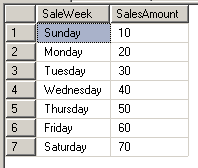
And we will pivot this table with this syntax :
SELECT Sunday, Monday, Tuesday, Wednesday, Thursday, Friday, Saturday
FROM (
SELECT SaleWeek, SalesAmount
FROM Sales
) AS up
PIVOT (SUM(SalesAmount) FOR SaleWeek IN
(Sunday, Monday, Tuesday, Wednesday, Thursday, Friday, Saturday)) AS pvt

The point is a formula below :
SELECT ,
FROM (source-query-that-produces-the-data) AS alias
PIVOT
(
FOR  IN () AS pvt_alias
It is easier to understand isn’t it ?
Thank You and Have nice day!!! ^_^
Original source : http://sqlsaga.com/sql-server/how-to-use-pivot-to-transform-rows-into-columns-in-sql-server/
Your friend
M. Faisol Riza




 M. FAISOL RIZA
Tinggalkan komentar