I write this article from the original source writed by Shailendra Chauhan. I think this a very interesting technique of SQL Server. It is about how to get/calculate running total and also how to calculate final total in column or row. So let’s check it out.
First, let’s create table for our experiment.
CREATE TABLE CustomerOrders
(
OrderID int identity,
Amount Decimal(8,2),
OrderDate SmallDatetime default getdate()
)

GO

INSERT INTO CustomerOrders(Amount) Values(120.12)
INSERT INTO CustomerOrders(Amount) Values(20.12)
INSERT INTO CustomerOrders(Amount) Values(10.12)
INSERT INTO CustomerOrders(Amount) Values(30.12)
INSERT INTO CustomerOrders(Amount) Values(40)

GO

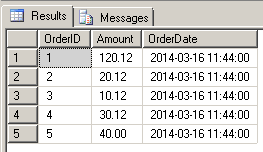
SELECT * FROM CustomerOrders
So, we will get result like this
Calculate Running Total
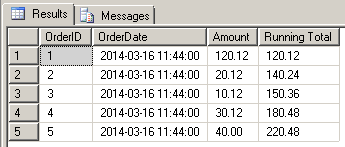
We will calculate running total with query below :
SELECT OrderID
,OrderDate
,CO.Amount
,(SELECT sum(Amount) FROM CustomerOrders
WHERE OrderID <= CO.OrderID) AS 'Running Total'
FROM CustomerOrders AS CO
And we will get the result
Calculate Final Total (in column)
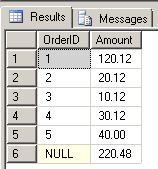
To calculate final total in column, we can use this query
SELECT OrderID, SUM(Amount) AS Amount
FROM CustomersOrders
GROUP BY OrderID WITH ROLLUP
And the result we will get
Calculate Final Total (in row)
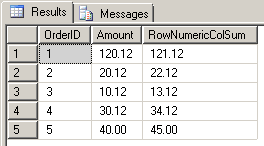
To calculate final total in row, we can use this query
SELECT OrderID, Amount, SUM(OrderID+Amount) AS RowNumericColSum
FROM CustomerOrders
GROUP BY OrderID,Amount
ORDER BY OrderID
And the result we will get




 M. FAISOL RIZA
Tinggalkan komentar